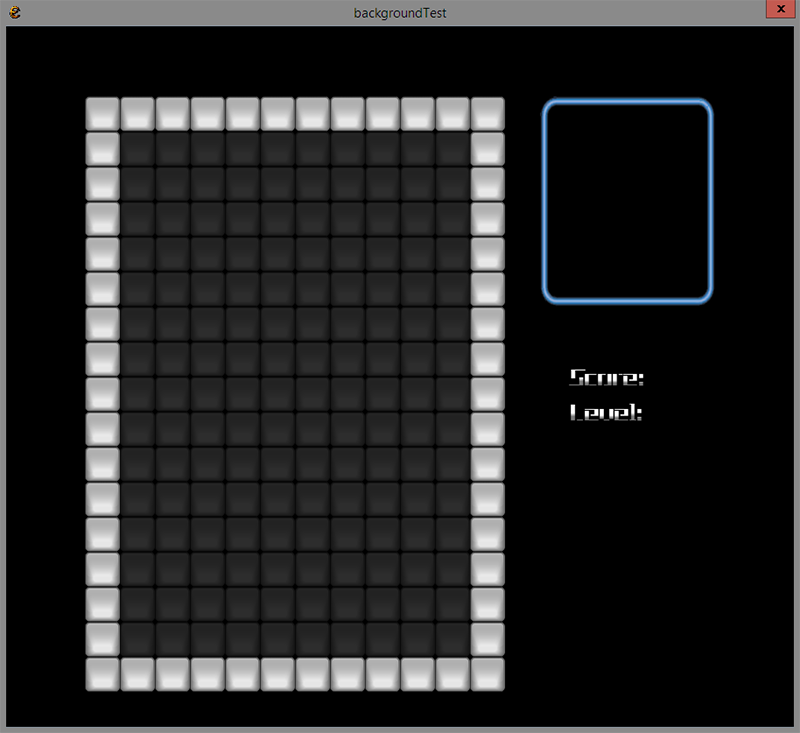
Figure 18.1: The Tetris background
The class for the background is kept simple. We never change anything in the background, so a create and method are all you need. We will never need more than one instance of this class. That’s why we will create an instance of this class right below its declaration.
The playing field will look like figure 18.1. Use it as a reference during the construction of this class.
To draw the playing field we use squares. This also could be a picture, but the squares are easy to construct and rather fitting for this game. In addition, you need a Rectangle to display an image on the position where the next block appears. Finally, we need to know the position where the score and the level should be drawn.
class background
{
   Mems<square> squares;
   Rect blockRect;
5   Vec2 scorePos;
   Vec2 levelPos;

   void create()
   {
10   }

   void draw()
   {
   }
15}

background Background;
In your test app, you can already use the two methods of this class. In addition, add the following line to the InitPre function:
D.mode(WINDOW_WIDTH, WINDOW_HEIGHT);
This rule ensures that the application window is sized according to our constants. In the previous test program it was not necessary to do so, but with the background we want to see the final result.